
Download Mystic Teller – Online Tarot Reading Companion, Free & Secure
Overview
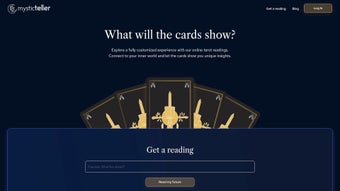
Mystic Teller is a modern, web‑based tarot reading platform that brings the mystique of traditional card spreads to any browser. Built with JavaScript, the app delivers an interactive experience that feels almost tactile, allowing users to shuffle, draw, and interpret cards just as they would with a physical deck. Whether you’re a seasoned tarot enthusiast or a curious beginner, Mystic Teller offers detailed, personalized readings that can illuminate personal questions, career dilemmas, relationships, or spiritual growth. Because it runs entirely online, there’s no need to install bulky software—simply open a modern browser, grant JavaScript permission, and you’re ready to explore the archetypal wisdom of the tarot. The service emphasizes guidance over prediction, reminding users that each spread is a reflective tool rather than a definitive answer. With an emphasis on accessibility, the platform is optimized for desktop, laptop, and mobile browsers, making it a convenient companion for daily introspection or deep‑dive sessions. Mystic Teller also respects user privacy; no personal data is stored beyond the session, and the connection is secured with HTTPS, ensuring that your spiritual inquiries remain confidential.
Core Features & How It Works
- Interactive Card Handling: Drag‑and‑drop functionality lets you shuffle, cut, and lay cards with realistic animation.
- Multiple Spreads: Choose from classic Celtic Cross, three‑card past‑present‑future, love spread, and custom layouts.
- Personalized Queries: Input a specific question or let the app generate a random focus for intuitive insight.
- In‑Depth Interpretations: Each card includes upright and reversed meanings, symbolism, and practical advice.
- Session History: Optionally save a read‑only snapshot of your spread for later reflection (stored locally in your browser).
- Multilingual Support: Available in English, Spanish, French, and German to serve a global audience.
- Secure & Private: All processing occurs client‑side; no data is transmitted to external servers beyond the encrypted connection.
- Responsive Design: Optimized layout ensures smooth interaction on Windows, macOS, Android, and iOS browsers.
- Free Access with Optional Donation: Core functionality is free; a small “tip jar” allows supporters to contribute.
How a Typical Reading Unfolds
When you launch Mystic Teller, the welcome screen invites you to select a spread type. After choosing, you can either type a question or click “Ask the Universe” for an open‑ended prompt. The virtual deck then appears, and you can shuffle by clicking or dragging the stack. Once shuffled, click on the cards you wish to draw; the app will flip them with a smooth animation, revealing the card face. Each revealed card expands into a modal window that displays comprehensive meanings, reversed interpretations, and actionable advice. The reading concludes with a summary that stitches together the narrative of the spread, helping you see patterns and connections across the cards. If you enable the session‑history toggle, a snapshot of the entire layout is saved locally, allowing you to revisit the reading without exposing your personal data to the internet.
Installation, Usage & Compatibility
Step‑by‑Step Installation
Because Mystic Teller is a web app, there is no traditional installation process. Follow these simple steps to start your first reading:
- Open any modern browser (Chrome, Firefox, Edge, Safari, or Opera) on a device with an active internet connection.
- Navigate to https://mysticteller.example.com. The site automatically redirects to the secure HTTPS version.
- If prompted, allow JavaScript execution. The platform relies on client‑side scripts for card animation and interpretation logic.
- Optionally bookmark the page for quick future access.
Using the App
Once the page loads, you’ll see a clean interface with three main sections: the deck area, the spread selector, and the query input. Begin by selecting your preferred spread. For a quick three‑card reading, choose “Past‑Present‑Future.” Type a question such as “How can I improve my career trajectory?” or click “Random Prompt.” Click the deck to shuffle, then click three cards in succession. Each card will flip, and a pop‑up will present its meaning. After reviewing all cards, click “Generate Summary” to receive a concise narrative that ties the cards together. If you wish to start over, simply click the “Reset” button, which clears the current spread while preserving any saved session snapshots.
Compatibility
Mystic Teller is engineered to run smoothly across all major operating systems that support modern web standards:
- Windows 10/11: Works flawlessly on Edge, Chrome, and Firefox.
- macOS Catalina and later: Safari, Chrome, and Firefox provide full functionality.
- Android 8.0+: Chrome Mobile and Firefox for Android render the app without lag.
- iOS 13+: Safari and Chrome on iPhone/iPad deliver the same interactive experience.
The app is fully responsive, automatically adjusting card size and layout to suit smaller screens while preserving readability of the card meanings. Because all processing occurs locally, performance depends mainly on the device’s JavaScript engine and internet speed for the initial page load. Users on slower connections may experience a brief loading indicator before the deck appears, but subsequent interactions are instant.
Pros & Cons
Advantages
- Free & Secure: No subscription required; all data stays in the browser.
- Realistic Interaction: Drag‑and‑drop and flip animations mimic a physical deck.
- Wide Range of Spreads: Supports both classic and custom layouts.
- Cross‑Platform: Works on Windows, macOS, Android, and iOS browsers.
- Multilingual: Accessible to non‑English speakers.
- Privacy‑First Design: No personal data is stored on servers.
Drawbacks
- Requires JavaScript: Users with disabled scripts cannot access the app.
- Limited Offline Capability: An internet connection is needed for the initial load.
- No Professional Tarot Reader Integration: The app provides automated interpretations only.
- Basic Customization: Users cannot upload personal card images or create entirely new spreads.
- Dependence on Browser Performance: Older browsers may exhibit slower animations.
Frequently Asked Questions (FAQ)
Is Mystic Teller completely free to use?
Yes, all core features—including all spreads, interpretations, and session history—are available at no cost. Users may optionally donate through a built‑in tip jar to support ongoing development.
Do I need to create an account or provide personal information?
No. Mystic Teller operates entirely in the browser without requiring sign‑up, login, or personal data. All session data is stored locally and is cleared when you close the browser, unless you manually save a snapshot.
Can I use Mystic Teller on a mobile device?
Absolutely. The responsive design adapts to smartphones and tablets on Android and iOS. You can shuffle, draw, and read cards just as you would on a desktop.
What if I want to read cards offline?
Because the app is web‑based, an initial internet connection is required to load the JavaScript files. After the first load, you can keep the page open and continue reading offline, but you must stay on the same tab; closing it will require a new connection.
How accurate are the interpretations?
Interpretations are based on traditional tarot symbolism and are generated by the platform’s built‑in database. While they are thorough and reliable for guidance, they are not a substitute for professional counseling or personal intuition.
Conclusion & Call to Action
Mystic Teller successfully bridges the gap between ancient divination and modern technology. By offering a free, secure, and highly interactive web experience, it makes tarot accessible to anyone with an internet‑connected browser. Whether you’re seeking quick daily insight or a deeper exploration of life’s complexities, the platform’s rich selection of spreads and detailed card meanings provide a solid foundation for self‑reflection. While the lack of a live reader and limited offline capabilities may be minor drawbacks for power users, the overall value—especially for beginners and casual seekers—is impressive. Ready to explore the archetypal narratives that the cards hold? Click here to start your first free reading with Mystic Teller and experience digital tarot that feels genuinely personal.



.png)



